• Buscar
  • Entrar

escuadrón

Cruz de San Andrés

  • Público
  • General
  • Presentaciones
  • Academia
  • Reactores
  • Helicópteros
  • Históricos
  • Av Comercial
  • Espacio
  • Videojuegos
  • Hardware
General

Instalación Oficial del DCS SIMPLE RADIO

  • Previous
  • 1
  • …
  • 82
  • 83
  • 84
  • 85
  • 86
  • …
  • 99
  • Next
User avatar
flankercobra
Instructor
Patrocinador

Instalación Oficial del DCS SIMPLE RADIO

hace 1 año

Instalación Oficial del DCS SIMPLE RADIO

hace 1 año
Rioku
hace 1 año
Estoy mapeando los comandos del SU25T, pero acabo de darme cuenta que el Simple Radio no va con este módulo.

¿Cómo lo tendría que hacer?

Saludos
Funciona igual que cuando se hizo el CBO, pero en lugar del Aries el SR, tienes una ventada 2D donde configurar las frecuencias.

Toogle radio overlay
  • Quote
User avatar
ramaz7036
Invitado

Instalación Oficial del DCS SIMPLE RADIO

hace 1 año

Instalación Oficial del DCS SIMPLE RADIO

hace 1 año
buenas tardes.

como todos saben, utilizamos discord para comunicarnos y ahora instale SimpleRadio.

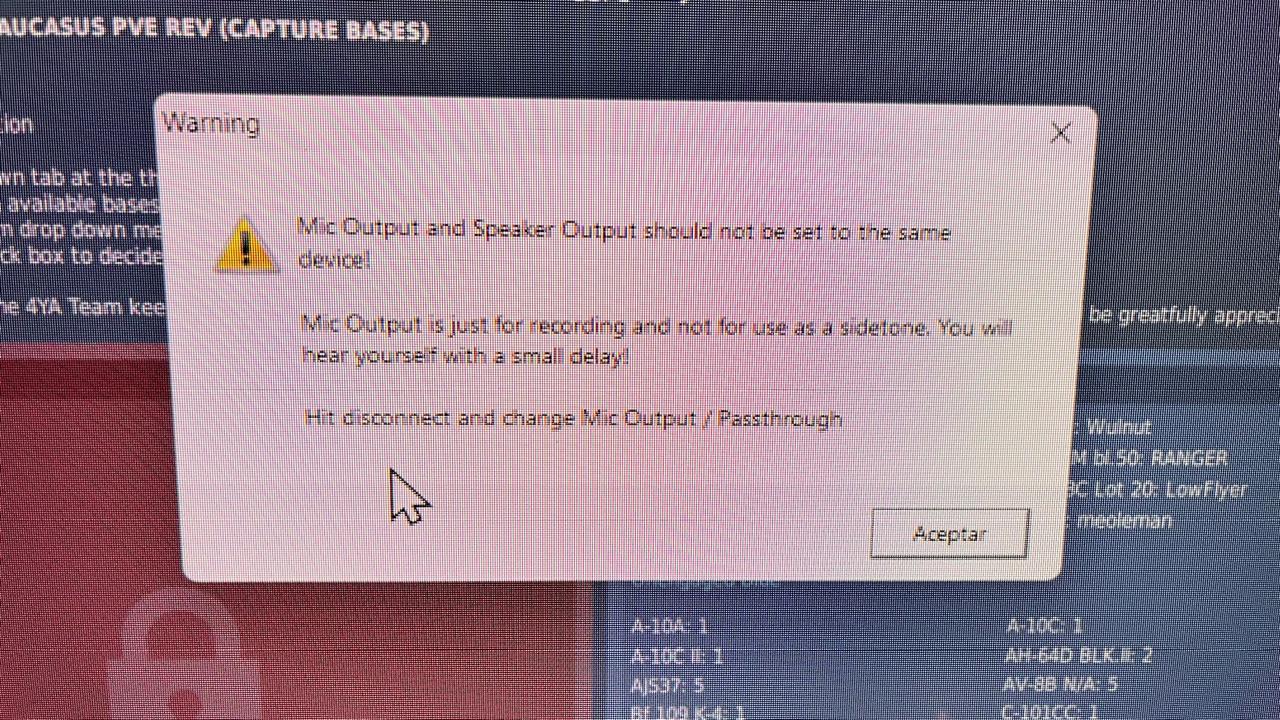
ayer dio un error y no me permitió escuchar ni hablar en discord y por ende en dcs tampoco.

que active mal?

Image
  • Quote
User avatar
Mirmidon
Instructor

Instalación Oficial del DCS SIMPLE RADIO

hace 1 año

Instalación Oficial del DCS SIMPLE RADIO

hace 1 año
Pues te dice que tienes seleccionado el mismo dispositivo como altavoz y como microfono

Prueba a poner el Micro en el micro de tus cascos y el altavoz en el los de los cascos a ver.
Image
  • Quote
User avatar
flankercobra
Instructor
Patrocinador

Instalación Oficial del DCS SIMPLE RADIO

hace 1 año

Instalación Oficial del DCS SIMPLE RADIO

hace 1 año
@Astiles ¿puedes poner la línea o cómo hiciste para hacer que se lance automáticamente el servidor de SR al entrar en un servidor?, gracias.
Image
  • Quote
User avatar
Astiles
Piloto

Instalación Oficial del DCS SIMPLE RADIO

hace 1 año

Instalación Oficial del DCS SIMPLE RADIO

hace 1 año
En la carpeta de intalación de Simple Radio, tienes que tener una subcarpeta de Scripts. Ahí hay un fichero llamado DCS-SRS-AutoConnectGameGUI.lua que tienes que copiar en la carpeta de C:\Users\Usuario\Saved Games\DCS.openbeta\Scripts\Hooks . En ese fichero hay tres líneas que manejan el cotarro:
SRSAuto.SERVER_SRS_HOST_AUTO = false
SRSAuto.SERVER_SRS_PORT = "5002"
SRSAuto.SERVER_SRS_HOST = "127.0.0.1"

La primera línea yo la tengo en true, así simple radio exporta automáticamente la dirección IP del servidor SRS. No toco nada más. Y creo que esto es todo.

EDITO. Si el puerto de SRS es diferente al 5002, tienes que cambiarlo. En tu router tienes que tener dirigido el puerto 5002 al PC de tu red local en el que está SRS. Si se diera el caso que quisieras usar un servidor SRS de un compañero, se dejaría la primera línea en false, se pondría el puerto del SRS externo y su dirección IP en la tercera línea
  • Quote
User avatar
flankercobra
Instructor
Patrocinador

Instalación Oficial del DCS SIMPLE RADIO

hace 1 año

Instalación Oficial del DCS SIMPLE RADIO

hace 1 año
OK; gracias!!!!!!!
Image
  • Quote
User avatar
flankercobra
Instructor
Patrocinador

Instalación Oficial del DCS SIMPLE RADIO

hace 1 año

Instalación Oficial del DCS SIMPLE RADIO

hace 1 año
Image

Pues parece que ya funciona correctamente el SRS en el servidor..., el error de ayer....., pues ni instalación ni líneas ni leches...., resulta que en el servidor tenía un .lua hook del SRS que creo arrastré a la vez que el export....

Ale una cosa menos.
Image
  • Quote
User avatar
Mirmidon
Instructor

Instalación Oficial del DCS SIMPLE RADIO

hace 1 año

Instalación Oficial del DCS SIMPLE RADIO

hace 1 año
Bien !!!!!
Image
  • Quote
User avatar
flankercobra
Instructor
Patrocinador

Instalación Oficial del DCS SIMPLE RADIO

hace 1 año

Instalación Oficial del DCS SIMPLE RADIO

hace 1 año
DCS-SRS BETA Release Version 2.2.0.0

I know its been a while since the last SRS release...

This is a new BETA for SRS and I cannot overstate how much work has gone into this behind the scenes from myself and contributors @gcask @Hacksaw Kristy and others. A huge thank you to them for their patience as this update has been a very long time coming!!!

This BETA converts the entire of SRS into .NET 8 (finally!) as well as a complete refactor of the codebase and support for a cross platform SRS server. For the first time there is a now a native command line server for Linux (tested on Ubuntu x64) along with an optional windows command line version as well as the traditional SRS server.

This also sets up SRS to be used on Android - with a skeleton of an Android App already completed which I may publish at some point in the future as a bit of fun (it'll be an APK for side loading) for EAM

This BETA is backwards compatible with existing SRS servers and clients - but be warned, SRS has a completely new folder structure once installed - so if you want to go back to the previous release you'll have to manually copy back all the .cfg, .txt and .csv files yourself to rebuild it so I recommend a fresh install.

For BETA feedback - please post ⁠SimpleRadio Standalone Support…⁠feedback-and-dev-updates as this is basically a rewrite of SRS under the hood - I definitely may have missed things!

I'd like to write more but the changelog is so long - Discord won't let me

Changelog:

Added
Added new way to autodetect server IP for SRS connection,
Added a new SRS autoconnect chat command that is much shorter (just port),
UI tidy up - consistent buttons on settings, controls etc,
Linux (x64) and Windows command line servers as alternatives. Full config available via command line flags or the config file,
CH-47F: Enabled ICS panel for Flight Engineer,
CH-47F: Honour BU setting,
Client: SRS scans for plugins under Mods/Tech,
CombinedArms: distinguish between the different slots (Tactical Commander, JTAC, Observer) - you can now have profiles for each slot,
Spectator / GCI etc will no longer take the position from the Camera - but will take the unit position if you take control of a unit,
CombinedArms: Vehicle type detection,
DCS: Mode2 transponder chat command added,
EAM: Preset folders for GCI/AWACS panel,
JF-17: Channel displayed in overlay,
JF-17: Encryption

CMS is encryption only, TRS is treated as HQ + encryption.
Encryption key can be changed by toggling between MAST/SLAV.

,

F/A-18C: Mode2 support,
F/A-18C: in-game radio activity indicators.
Limitations:
Cannot display two active radios at the same time - will get flashing alternating triangle if that's the case.
MIDS are ready to go, but they're not modelled on the indicators,
Will not work if VoIP is enabled on the server (out of caution),
,
,


Changed
New folder structure for the SRS install,
CH-47F: Improved GUARDs handling.,
CombinedArms: 'Default' is now 'Spectator'.,
F/A-18C: Improved UFC parsing logic,
JF-17: Being on the DL radio (Channel 199 on COMM2) will disable that radio for SRS.,
Server: Improved autoconnect script,
SRS: Many dependencies updated to more recent versions,
SRS: Migrated to .NET 8 - You may need to install https://dotnet.microsoft.com/en-us/down ... -installer,
SRS: NAudio updated to 2.0,

Fixed

Client: icons unviewable on General tab,
F/A-18C: MIDS disabled if Link16 is OFF.,
JF-17: Radio names,
JF-17: RT vs RT+G modes
Image
  • Quote
User avatar
flankercobra
Instructor
Patrocinador

Instalación Oficial del DCS SIMPLE RADIO

hace 1 año

Instalación Oficial del DCS SIMPLE RADIO

hace 1 año
Parece que, otra vez, SRS le va a pegar un adelantamiento por la derecha al sistema de DCSW.

Según comentan la beta es compatible con la versión actual de SR, pero cambia completamente la nueva estructura de carpetas...., estoy tentado porque para el JF17 le pega un buen repaso.
Image
  • Quote
General
  • Previous
  • 1
  • …
  • 82
  • 83
  • 84
  • 85
  • 86
  • …
  • 99
  • Next
No registered users
  • © 2026 Luis Glez 'Orleans'