Welcome cadet to the Black Sea Fleet Anti-Submarine Warfare Research and Training Center at Novorossiysk. In this training course you will learn the basics of heliborne anti-submarine warfare. This knowledge will prepare you for operational ASW missions which surely are to follow.
Features of this mission includ script based solutions for submerged submarines and the basic ASW equipment, such as sonobuoys, dipping sonar, MAD and air dropped torpedoes. The under-the-hood simulation of these aspects is brought to the player by text output, sounds and some special effects. This mission will provide an opportunity to quickly try out this new mission type in a training environment. More difficult, "true" submarine hunt missions will follow by me and as I hope by other mission designers.
[STRIKE]While this mission is set up as a multiplayer coop, it is currently only cleared for singleplayer use. You can either start it as a normal SP mission and select your helicopter of choice (Mi-8 or UH-1) at the mission start, or play it by setting up your own server. I have tested the mission in multiplayer with friends and we have experienced repeated disconnects and loss of syncing. I assume that this is somehow caused by the script, possible by the server being overwhelmed with script data. At least it looks like that. The exact cause is not clear to me yet though, and I also think that the amount of data being handled by the script is not extraordinary big. Please feel free to test this in multiplayer, perhaps we can figure it out together. Again, playing alone, either SP or as the host, should be perfectly fine.[/STRIKE]
Edit: The mission should work both in MP and SP. MP might require that host and clients set their connection speed to LAN.
The script behind this mission is set up for easy modification and I hope it will spawn missions by other mission designers. The script is divided into a main script and a config script, which holds all the mission specific data. So only the config script needs to be adjusted for a new mission, while the main script can easily be replaced with subsequent updated versions. Please feel free to copy and adjust the mission as you like. I will also post the scripts in the Mission Builders' Corner of the forum once this mission has been out for a bit, as I am sure a broader player base will discover some bugs first.
Lastly I would like to mention that while I tried to make this heliborne ASW environment as authentic and realistic as possible within the limits of DCS, I am by no means an expert on the topic. I do not claim that the systems and tactics portrayed here are true to real life. Almost everything I learned about helicopter ASW comes from playing Dangerous Waters. So this mission is also meant as a tribute to the awesome simulation by Sonalysts. Some players might even recognize some of the sounds
November 3, 2013, Mission Updated to v2
Changelog:
-Fixed disappearing menu bug
-Smoke Marker Buoys endurance changed from 20 min to 6 min
-Dipping sonar max. washout depth reduced from 30 m to 10 m
-MAD detection distance now also depends on sub depth
-MAD detection distance increased to 400m
-Added thermal layer
-Sonobuoys can be dropped deep or shallow
-Torpedo search cone now affected by depth difference between sub and torpedo
-Torpedo search depth can be preselected
-Dipping sonar now displayes the coastline
-FAB-250 and Mk-82 work like depth charges
-Mi-8 has FAB-250
-Added Su-25, Su-25T and A-10C
Download
SpoilerHelicopter Anti-Submarine Warfare 101
Thermal Layer
The thermal layer is phenomenon in underwater acoustics where change of temperature of the water will cause a layer at a certain depth that is difficult for sound to penetrate. The layer is abstracted here by reducing the detection range of active sonar (dipping sonar, torpedo homing head) by half if the sensor and the target are on opposite sides of the layer. The signal strength for passive sonar (sonobuoys) is reduced by an amount as set in the mission when crossing the layer. MAD operation is unaffected by the thermal layer. The current depth of the thermal layer is displayed in Sonobuoy Station and the Dipping Sonar Station.
Smoke Marker Buoys
These are simple air droppable buoys that mark a position with white smoke. They expire after 6 minutes. Drop smoke marker buoys by selecting RADIOMENU>F10>Drop Smoke Marker.
Sonobuoys
Sonobuoys are air droppable buoys that lower a hydrophone into the water and send back sonar data to a receiving aircraft. Sonobuoys come in different variations. The model simulated here is an omni-directional passive buoy. This means that the buoy will listen to sounds from any unspecified direction. Sonobuoys can be set to lower their hydrophone shallow (50 m depth) or deep (400 m depth). This allows for sonobuoys to listen either above or below the thermal layer. Sonobuoys are dropped by selecting RADIOMENU>F10>Sonobuoy Station>Drop Sonobuoy Shallow or RADIOMENU>F10>Sonobuoy Station>Drop Sonobuoy Deep.
Selecting RADIOMENU>F10>Sonobuoy Station>Display Station will display an overview of all dropped sonobuoys and the signal to noise ratio SNR of the loudest sound they receive. Note that the sonar data is already processed at this point and the display will only show the SNR value of genuine submarine contacts. Passive sonar detection range is dependent on target sub noise level, target speed, thermal layer depth, oceanic ambient noise and receiving sensor quality. As a rule of thumb a maximum detection range of 1000-2000 m should be expected against a slow moving submarine. If no submarine is detected, the sonobuoy is considered “cold”. Sonobuoys are employed for initial detection of a submarine. They do not provide target tracking data.
Sonobuoy signals can be received by aircraft at distance up to 20 km. Helicopters can receive the signals of sonobuys dropped by other helicopters. Each sonobuoy is equipped with a small FM beacon, allowing locating the buoy by radio navigation equipment.

Dropping a sonobuoy
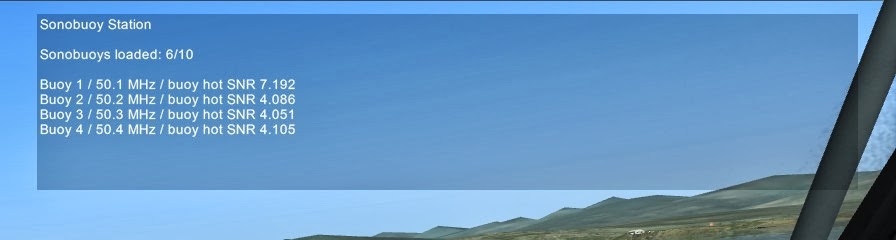
Sonobuoy display
Dipping Sonar
Dipping sonar is an active sonar system lowered into the water by cable from a hovering helicopter. The hydrophone sends the characteristic pings into the water and records the bearing and range of any ping being reflected.
The dipping sonar is lowered by selecting RADIOMENU>F10>Dipping Sonar Station>Deploy Dipping Sonar. The hydrophone will be lowered to the maximum cable length of 300 m but can be stopped at any length by selecting RADIOMENU>F10>Dipping Sonar Station>Stop Dipping Sonar. RADIOMENU>F10>Dipping Sonar Station>Retract Dipping Sonar will likewise pull the hydrophone back to the helicopter.
The hydrophone will start to transmit once it is in the water and winching is stopped (either manually or by reaching the maximum cable length). RADIOMENU>F10>Dipping Sonar Station>Show Display will display all active sonar returns, including submarines and surface ships. Maximum detection range is approximately 6500 m. Detection range for targets on the opposite side of the thermal layer from the hydrophone is reduced by half. The hydrophone needs to be at a depth of 10 m or greater to be below the noisy layer of water near the surface. When transmitting in the surface layer, the display will be “washed out” by surface noise.
Maximum speed of the helicopter when the dipping sonar is in the water must not exceed 15 kph in any direction. Otherwise the hydrophone might be tore away.
The dipping sonar is an excellent sensor for determining precise target position data but will leave a helicopter severely restricted in movement.

Dipping sonar display showing a contact on bearing 055 at 500 m distance and a group of contacts 5000-6000 m to the north.
Magnetic Anomaly Detector MAD
Magnetic anomaly detection is the means of detecting the disturbances in the magnetic field of the earth by large metallic objects such as submarines and ships. The sensor called MAD bird is attached to the end of a cable and trailed behind the helicopter. The MAD bird can be deployed with RADIOMENU>F10>MAD Station>Deploy MAD and likewise retracted with RADIOMENU>F10>MAD Station>Retrieve MAD.
Pressing RADIOMENU>F10>Mad Station>Show Display will show the MAD display, which records all disturbances in the magnetic field of the past 60 seconds. MAD detection has a fairly low range of 400 m in ever distance, including in the vertical. MAD will detect submerged submarines as well as ships on the surface. In order to not be disturbed by the magnetic field of the helicopter, the MAD bird needs to be clear of the helicopter. To trail the MAD bird with sufficient separation, the helicopter needs to move at least 50 kph. If moving slower the MAD bird will hang below the helicopter and the MAD recorder will detect disturbed results.
If the MAD bird contacts the surface it will be tore away.
MAD has a low range for initial detection. It is still a useful sensor to supplement other sensors during the initial search, as the helicopter crew will call out MAD alerts even if the MAD display is not monitored continuously. MAD is an excellent sensor during the terminal stage of the hunt as it allows to precisely confirming the position of a sub while retaining freedom to maneuver.
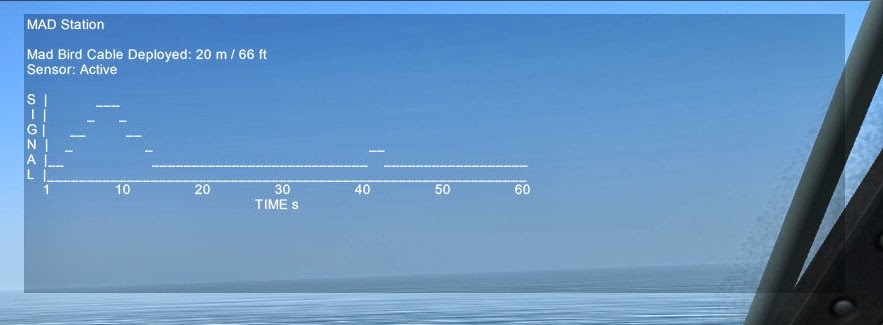
MAD display after a good MAD pass
Torpedoes
Air dropped torpedoes are the primary anti-submarine weapon of helicopters. Torpedoes can be dropped by pressing RADIOMENU>F10>Weapon Station>Drop Weapon. RADIOMENU>F10>Weapon Station>Weapon Depth Preset lets you select the search depth of your next torpedo. The default value is 100 m. RADIOMENU>F10>Weapon Station>Display Station will show an overview of the weapon and smoke marker buoy inventory, as well as remaining runtime of dropped torpedoes.
Once dropped, the torpedo dives on its initial heading to its preset search depth with a rate 14 m/s. The weapon will also cover the same distance as its diving depth horizontally. Once at search depth, the torpedo activates its active sonar to search for targets and commences a clockwise search circle at a speed of 20 kts. The homing sensor of the torpedo has a search cone of 60° and a detection range of 1400 m. If the target is on the other side of the thermal layer, the detection range is reduced to 700 m. Once a target is detected the torpedo accelerates to 40 kts and steers a pure pursuit until impact. Air dropped ASW torpedoes are programmed to ignore ships on the surface.
Torpedoes have a runtime of 6 minutes and will automatically shut down after running out of power.
Due to their circular search pattern, torpedoes are bound to hit a submarine eventually if dropped in the vicinity of a target as long as they have power remaining. Late acquiring of the target or high target speed increases the chance that the torpedo will run out of power before reaching the submarine. In rare cases it might be possible that a torpedo runs around a very slow or stationary sub in the center of the torpedo’s search circle. If the torpedo is dropped with a search depth setting differing too much from the submarine's actual depth, the sub might be outside the vertical limits of the torpedo's search cone.

A submarine in green and a torpedo in red in Show Truth mode. The torpedo is running its circular search pattern.
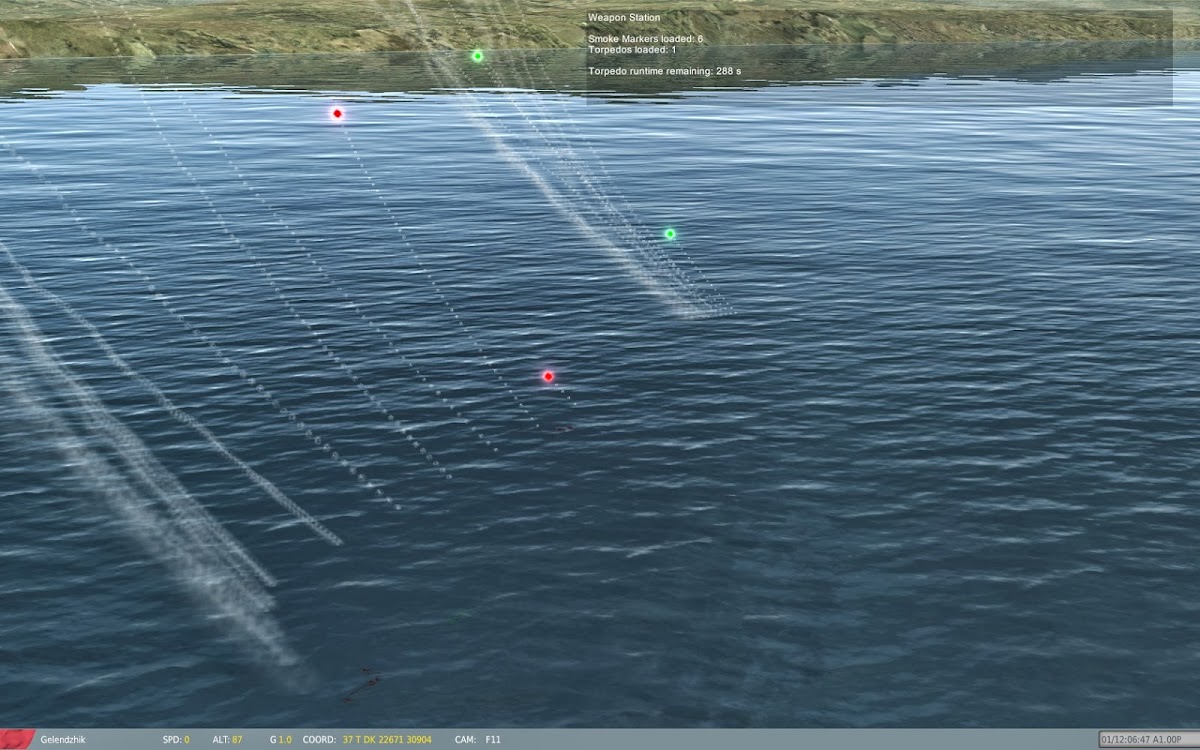
The torpedo has acquired the sub and accelerates in for the kill.

Depth Charges
If configured by in the mission, FAB-250 and Mk-82 areal bombs are transfered into depth charges. The DCs are dropped like ordinary bombs. Upon water entry, they descend to the depth as set by RADIOMENU>F10>Weapon Station>Weapon Depth Preset before detonating. Detonation must occur within 25 m to ensure complete destruction of the target submarine.
Rearm/Repair
Landing in the vicinity of designated service units will automatically replenish the inventory of torpedoes, sonobuoys and smoke markers. After all expendables are reloaded, lost dipping sonars or MAD birds are replaced. This will take about 30 seconds each. Ships can also act as service vehicles.
Show Truth
If the mission is configured to allow it, RADIOMENU>F10>Show Truth and RADIOMENU>F10>Hide Truth will toggle the show truth mode. With this mode activated, the position of submarines are marked with green flares and the position of torpedoes are marked with red flares.
ASW Tactics Introduction
1. Intelligence
Carefully review the provided intelligence to plan your sub hunt. If you are to prosecute a detected submarine, note it’s last known position, speed and where it might be going. With this information, calculate the area where the sub could be now and in the future. If you are to protect a certain area or unit from an unknown submarine threat, determine where you are most likely to detect it, such as in ocean chokepoints or in front of its potential targets.
2. Sonobuoy search
Make a sonobuoy plan according to the intelligence. If you are searching around a last known position, make a sonobuoy field around it. If you know where a sub is going, lay a sonobuoy line which the sub will have to cross. Drop sonobuoys in the correct position relative to each other by flying a precise heading and speed and using a stopwatch. Put attention to the correct spacing between the buoys. A bigger spacing will cover more ocean but increases the chances that a sub might slip through undetected. As a rule of thumb space sonobuoys 2000 m apart. If you know that the sub is traveling fast or is very noisy, increase the distance. Drop your sonobuoys with the shallow setting if you think the target sub is a above the thermal layer or with the deep setting if you think it is below the layer. If you do not know the target depth, alternate between deep and shallow sonobuoys. For the spacing between the buoys keep in mind that detection range for targets on the other side of the thermal layer is reduced.
While doing sonobuoy work it is possible to have the MAD deployed and hope to get a lucky MAD hit. Be careful though when flying low and slow over the water to not strike the water with the MAD bird. Remember to retrieve your MAD before coming in for a low hover, for example to deploy the dipping sonar.
After laying your sonobuoy net, stay in the area and monitor the sonobuoy display until a buoy turns “hot”. Tune in the frequency of the buoy into your FM direction finder and approach it.
3. Determine the target position with the dipping sonar
Come to a hover near the hot buoy and deploy your dipping sonar to determine the position of the target. Lower your dipping sonar below 10 m depth to get clear returns free of noisy surface water layer interferences. Vary the depth of the dipping sonar to search both above and below the thermal layer. The dipping sonar might also find other ships in the vicinity, so make sure that you are tracking the correct target. Remember to stay in a stable hover to not rip away the hydrophone.
4. Confirm the target position and track with MAD
After retrieving your dipping sonar, proceed to the suspected position of the sub, flying low with your MAD deployed. But not too low as to not strike the MAD bird on the water. Fly criss-cross over the suspected sub position until you get a maximum MAD signal, then immediately mark the position with a smoke marker buoy. Wait a moment and repeat the procedure again to place a second smoke marked buoy. The smoke markers are now indicating the position, heading and speed of the submarine.
5. Coming in for the kill
Approach the submarine from behind with both smoke markers aligned. Approximately 200 m before reaching the sub (remember that it continued to move since the last smoke marker) drop a torpedo.
Visually monitor the area. If you do not see a large water plume from an underwater explosion within 6 minutes, your torpedo has missed. Continue the hunt. Fuente
;)